If you're looking for 3D assets and you've landed on both of these, you've probably noticed they don't feel like the same kind of product. They aren't. Sketchfab is the largest open 3D library on the web, over 8 million models with more than a million free downloads under Creative Commons. Korvix3D is a curated subscription library built around getting assets into your scene with the materials already wired up.
Both are worth using. They're good at different things, and which one belongs in your pipeline depends almost entirely on what you make.
The short version
Sketchfab wins on scale, scans and publishing. Nothing else has its photogrammetry and cultural heritage collection, its viewer is the best on the web, and it has integrations with roughly a hundred pieces of software.
Korvix3D wins on getting assets into a render without cleanup. Our bridges hand you models already scaled and wired for your renderer, we cover Maya and 3ds Max where Sketchfab's importers don't reach, and every plugin plus thousands of free assets costs nothing.
Now the detail.
Getting assets into your software
This is where the two platforms diverge most, so it's worth understanding properly.
Sketchfab has a large integration ecosystem, split into two directions. Its exporters page lists 93 entries for publishing your work to Sketchfab, covering everything from 3ds Max and Maya to mobile scanning apps and CAD packages. Many of those are native features the software vendors built themselves rather than add-ons, which is a real achievement. Its importers page lists 49 entries for pulling models into your software, and Sketchfab maintains its own open-source importers for Blender, Cinema 4D, Unity, Unreal Engine and Godot.
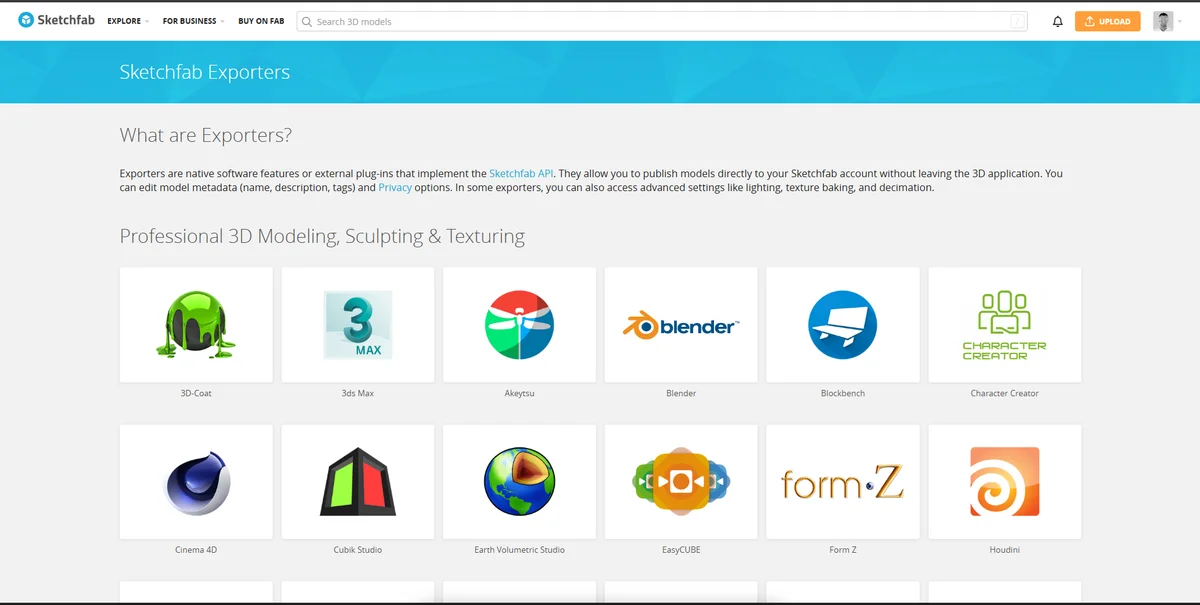
So Sketchfab does have in-app import, and if you work in Blender it works well. Their Blender add-on handles both directions, logs in with an API token, and writes an attribution block into your file listing every creator and licence. It shipped an update on 6 August 2026.
Three practical differences matter once you're actually working.
Maya and 3ds Max. Both appear on Sketchfab's exporters list, so you can publish from them. Neither appears on the importers list. If you're a Maya or Max artist wanting Sketchfab content in your scene, you're downloading files and importing by hand, every time. We ship maintained bridges for both, along with Blender, Cinema 4D, SketchUp, Unity and Unreal.
Plugin upkeep. Sketchfab's Blender add-on is current. The rest of their importer lineup hasn't moved in a while: Unity's last release was a 2022 prerelease, Unreal's was 2021 and its README still refers to targeting Unreal 5.0 Early Access, Cinema 4D was 2021, Godot was 2020. If you're on a recent Unreal or Godot build, expect to do some work. Our bridges are all current, though I'll be straight that our Blender, Maya, 3ds Max and Cinema 4D bridges are considerably more built out than our Unity and Unreal ones, which are early.
What arrives in your scene. Sketchfab's importers run on its Download API, which serves glTF, GLB and USDZ. The docs say plainly that models "are not currently available in their source formats such as FBX and OBJ through the API." glTF is a solid format and it carries PBR materials properly, but a glTF material isn't an Arnold shader or a V-Ray material or a Redshift node graph. You'll be rewiring after import. Our bridges deliver assets scaled to real-world units with materials already built for the renderer you're in, which is the whole reason the bridge exists.
Worth knowing in Sketchfab's favour: download from their website rather than through a plugin and you also get the original file the author uploaded. The format limit only applies to the API, so it only affects plugin imports.
What the free tiers actually give you
This surprises people, so it's worth spelling out.
Sketchfab's library access is free. Over a million Creative Commons models, no account cost. Their paid plans buy creator features instead: more uploads, private models, embed customisation, viewer API access, starting at $15 a month billed yearly. If you're only downloading, you never need to pay them anything.
Our free tier gives you thousands of free assets, the desktop Asset Hub, and every bridge plugin at no cost. The one-click viewport import works exactly the same on a free account as a paid one. Anything you download stays licensed to you permanently under a standard commercial licence, even if you never subscribe.
That last part matters more than it sounds. You can install our Maya or Blender bridge today, pull free assets into commercial client work, and pay nothing indefinitely. The subscription only exists to unlock the premium catalogue.
Licensing, which is where subscriptions earn their money
Sketchfab's free library runs on Creative Commons, and the licences vary per model. Mostly CC-BY, plus NonCommercial, ShareAlike and NoDerivatives variants, and some models under a non-CC free licence. Most allow commercial use. Attribution is usually required, though CC0 models need none.
That's completely reasonable for an open library, and for a hobby project or a portfolio piece it's a non-issue. It gets less pleasant at production scale. If you're dressing an architectural scene with forty models, you're checking forty licences and tracking attribution for all of them, and one NonCommercial model slipping into paid client work is a problem you don't want to discover later.
Our whole catalogue runs on one commercial licence. Download it, use it, ship it. Nothing to check per asset, and downloads survive cancellation. For studio and freelance work where somebody eventually asks whether the assets are cleared, that's the difference between a five-second answer and an afternoon.
Where the libraries actually differ
Sketchfab's scale is not in question. Over 8 million models, more than a million free. Its photogrammetry and cultural heritage collection, built with museums, universities and heritage organisations, has no equivalent anywhere. If you need a scan of a real artifact or building, that's where you go, and no subscription library is going to change that.
Sketchfab is also open submission, which is what gives it that scale. The tradeoff is that quality varies a lot, so finding production-ready work in the general categories means filtering.
Korvix3D is the opposite trade. Much smaller, reviewed before publishing, and deliberately concentrated. As of August 2026 our depth is in interiors and architectural visualisation: furniture, decor, props, lighting and vegetation, which is where most of our creators work and where the library is strongest. If you're furnishing rooms, dressing archviz scenes or building product renders, you'll find what you need and the subscription maths works in your favour.
Outside that lane we're thinner, and I'd rather tell you than have you find out after subscribing. Characters, creatures, weapons and full environment kits aren't our strength yet. We're expanding fast, with a substantial volume of new assets landing through the rest of this year and character coverage growing right now, but check the browser for your category before you commit rather than taking my word for where we are this week.
If you need broad coverage across every category today, Sketchfab has more of everything. If you need interiors and archviz assets that drop into Maya or Max ready to render, that's the trade we're making.
Publishing your own work
Sketchfab, no contest. The viewer is the best on the web, embedding is trivial, and those 93 exporters mean you can publish from almost anything. We're a library, not a publishing platform, so if you want to show work interactively or share a model with a client for review, use Sketchfab. I do.
Side by side
| Sketchfab | Korvix3D |
|---|
Library scale | 8M+ models, 1M+ free | Curated, thousands of assets, growing quickly |
Strongest at | Photogrammetry, heritage scans, breadth | Interiors, furniture, decor, archviz |
Curation | Open submission, quality varies | Reviewed before publishing |
Maya and 3ds Max import | No importer plugin | Maintained bridges for both |
Other integrations | Official Blender, C4D, Unity, Unreal, Godot importers | Blender, C4D, SketchUp, Unity, Unreal |
Plugin upkeep | Blender current, others 2020 to 2022 | All current, Blender/Maya/Max/C4D most complete |
What arrives in scene | glTF, GLB, USDZ, then wire materials yourself | Scaled, renderer-ready materials |
Website download | Original source file plus glTF and USDZ | Bridge or desktop hub |
Licensing | Per-asset Creative Commons, attribution usually needed | One commercial licence, permanent after cancelling |
Free tier | 1M+ CC downloads, no cost | Thousands of assets plus every bridge plugin, no cost |
Paid plans | $15/mo yearly, creator features not library access | Pro $12/mo or $129/yr, Plus $25/mo or $240/yr. India ₹999/₹9,999 and ₹1,599/₹16,999 plus GST |
Platforms | Mostly cross-platform | Asset Hub is Windows only for now |
Buying paid assets | Store closed Oct 2024, paid content on Fab | Subscription |
Viewer and embeds | Best available | Not offered |
One note on that pricing row, because it's easy to compare wrongly. Sketchfab's $15 buys creator tools, not assets, since their library is free. Our subscription buys download volume from the premium catalogue. Different products, so don't read those two numbers as competing.
One thing that changed recently
If you last looked at Sketchfab a while ago, the Store closed in October 2024. Paid models moved to Epic's Fab marketplace, and Epic has owned Sketchfab since 2021. Old products are still viewable on Sketchfab but you can't buy them there.
Free Creative Commons downloads still work, and I verified that while writing this. Sketchfab has said it intends to move free licensing to Fab eventually, but no date has been announced. Practically, this means if you're comparing places to buy assets, the real comparison is us versus Fab. If you're after free assets, Sketchfab is still enormous and still working.
So which one
Sketchfab if you need scanned real-world objects or heritage material, you want the widest possible free library and don't mind checking licences per asset, you work in Blender where their importer is solid, you want to publish or embed your own work, or you need categories a focused library won't cover.
Korvix3D if you work in interiors, furniture, product or architectural visualisation, you're in Maya or 3ds Max where Sketchfab has no importer, you'd rather render immediately than rewire glTF materials, you want one licence instead of per-asset terms, or you want to try a bridge workflow without paying for it.
Both, realistically. Most working artists end up with Sketchfab bookmarked for scans and publishing, and a subscription library for the everyday scene-dressing work. They're not substitutes.
A correction to an earlier version of this article
An earlier version of this post claimed Sketchfab had "no plugin for Blender, Maya, 3DS Max, Cinema4D, Sketchup, Unity, or Unreal Engine" and "no software integration of any kind." That was wrong, and Sketchfab co-founder Alban Denoyel pointed it out publicly after I shared the article. As covered above, Sketchfab lists 93 exporters and 49 importers and maintains official importer plugins for five applications.
I've rewritten the piece and corrected the plugin section, the pricing comparison, which had been misleading, and some of our own library claims that were more generous than the catalogue justified. Thanks to Alban for the correction. Checking a competitor's documentation before writing about it is a low bar and I'll clear it next time.
Questions
Does Sketchfab have plugins for 3D software? Yes, a lot. 93 exporters for publishing to Sketchfab and 49 importers for pulling models into your software, including official Sketchfab-maintained importers for Blender, Cinema 4D, Unity, Unreal Engine and Godot. Maya and 3ds Max have exporters but no importer.
Can you still download free models from Sketchfab? Yes. Over a million models under Creative Commons, working as of August 2026. The paid Store closed in October 2024 and paid content moved to Fab, but free downloads continue with no announced end date.
What formats do Sketchfab downloads come in? From the website, the author's original upload plus glTF and USDZ. Through the Download API, which the plugins use, glTF, GLB and USDZ only.
Do I need to pay for Korvix3D to use the bridge plugins? No. Every bridge is included on the free tier and one-click import behaves identically to a paid account. Free assets carry a standard commercial licence and stay yours permanently. The subscription unlocks the premium catalogue.
What is Korvix3D actually good for right now? Interiors and architectural visualisation: furniture, decor, props, lighting and vegetation. We're expanding into other categories, but check the browser for your specific category before subscribing.
Is Korvix3D on macOS? Not yet. The Asset Hub is Windows only at the moment.
Try the free tier, which includes every bridge plugin at no cost: sign up or download a bridge.
Sources: sketchfab.com/exporters, sketchfab.com/importers, Sketchfab Download API docs, Sketchfab store closure FAQ, sketchfab.com/about, plugin repos at github.com/sketchfab. Korvix3D details current as of 8 August 2026.


If you're looking for 3D assets and you've landed on both of these, you've probably noticed they don't feel like the same kind of product. They aren't. Sketchfab is the largest open 3D library on the web, over 8 million models with more than a million free downloads under Creative Commons. Korvix3D is a curated subscription library built around getting assets into your scene with the materials already wired up.
Both are worth using. They're good at different things, and which one belongs in your pipeline depends almost entirely on what you make.
The short version
Sketchfab wins on scale, scans and publishing. Nothing else has its photogrammetry and cultural heritage collection, its viewer is the best on the web, and it has integrations with roughly a hundred pieces of software.
Korvix3D wins on getting assets into a render without cleanup. Our bridges hand you models already scaled and wired for your renderer, we cover Maya and 3ds Max where Sketchfab's importers don't reach, and every plugin plus thousands of free assets costs nothing.
Now the detail.
Getting assets into your software
This is where the two platforms diverge most, so it's worth understanding properly.
Sketchfab has a large integration ecosystem, split into two directions. Its exporters page lists 93 entries for publishing your work to Sketchfab, covering everything from 3ds Max and Maya to mobile scanning apps and CAD packages. Many of those are native features the software vendors built themselves rather than add-ons, which is a real achievement. Its importers page lists 49 entries for pulling models into your software, and Sketchfab maintains its own open-source importers for Blender, Cinema 4D, Unity, Unreal Engine and Godot.
So Sketchfab does have in-app import, and if you work in Blender it works well. Their Blender add-on handles both directions, logs in with an API token, and writes an attribution block into your file listing every creator and licence. It shipped an update on 6 August 2026.
Three practical differences matter once you're actually working.
Maya and 3ds Max. Both appear on Sketchfab's exporters list, so you can publish from them. Neither appears on the importers list. If you're a Maya or Max artist wanting Sketchfab content in your scene, you're downloading files and importing by hand, every time. We ship maintained bridges for both, along with Blender, Cinema 4D, SketchUp, Unity and Unreal.
Plugin upkeep. Sketchfab's Blender add-on is current. The rest of their importer lineup hasn't moved in a while: Unity's last release was a 2022 prerelease, Unreal's was 2021 and its README still refers to targeting Unreal 5.0 Early Access, Cinema 4D was 2021, Godot was 2020. If you're on a recent Unreal or Godot build, expect to do some work. Our bridges are all current, though I'll be straight that our Blender, Maya, 3ds Max and Cinema 4D bridges are considerably more built out than our Unity and Unreal ones, which are early.
What arrives in your scene. Sketchfab's importers run on its Download API, which serves glTF, GLB and USDZ. The docs say plainly that models "are not currently available in their source formats such as FBX and OBJ through the API." glTF is a solid format and it carries PBR materials properly, but a glTF material isn't an Arnold shader or a V-Ray material or a Redshift node graph. You'll be rewiring after import. Our bridges deliver assets scaled to real-world units with materials already built for the renderer you're in, which is the whole reason the bridge exists.
Worth knowing in Sketchfab's favour: download from their website rather than through a plugin and you also get the original file the author uploaded. The format limit only applies to the API, so it only affects plugin imports.
What the free tiers actually give you
This surprises people, so it's worth spelling out.
Sketchfab's library access is free. Over a million Creative Commons models, no account cost. Their paid plans buy creator features instead: more uploads, private models, embed customisation, viewer API access, starting at $15 a month billed yearly. If you're only downloading, you never need to pay them anything.
Our free tier gives you thousands of free assets, the desktop Asset Hub, and every bridge plugin at no cost. The one-click viewport import works exactly the same on a free account as a paid one. Anything you download stays licensed to you permanently under a standard commercial licence, even if you never subscribe.
That last part matters more than it sounds. You can install our Maya or Blender bridge today, pull free assets into commercial client work, and pay nothing indefinitely. The subscription only exists to unlock the premium catalogue.
Licensing, which is where subscriptions earn their money
Sketchfab's free library runs on Creative Commons, and the licences vary per model. Mostly CC-BY, plus NonCommercial, ShareAlike and NoDerivatives variants, and some models under a non-CC free licence. Most allow commercial use. Attribution is usually required, though CC0 models need none.
That's completely reasonable for an open library, and for a hobby project or a portfolio piece it's a non-issue. It gets less pleasant at production scale. If you're dressing an architectural scene with forty models, you're checking forty licences and tracking attribution for all of them, and one NonCommercial model slipping into paid client work is a problem you don't want to discover later.
Our whole catalogue runs on one commercial licence. Download it, use it, ship it. Nothing to check per asset, and downloads survive cancellation. For studio and freelance work where somebody eventually asks whether the assets are cleared, that's the difference between a five-second answer and an afternoon.
Where the libraries actually differ
Sketchfab's scale is not in question. Over 8 million models, more than a million free. Its photogrammetry and cultural heritage collection, built with museums, universities and heritage organisations, has no equivalent anywhere. If you need a scan of a real artifact or building, that's where you go, and no subscription library is going to change that.
Sketchfab is also open submission, which is what gives it that scale. The tradeoff is that quality varies a lot, so finding production-ready work in the general categories means filtering.
Korvix3D is the opposite trade. Much smaller, reviewed before publishing, and deliberately concentrated. As of August 2026 our depth is in interiors and architectural visualisation: furniture, decor, props, lighting and vegetation, which is where most of our creators work and where the library is strongest. If you're furnishing rooms, dressing archviz scenes or building product renders, you'll find what you need and the subscription maths works in your favour.
Outside that lane we're thinner, and I'd rather tell you than have you find out after subscribing. Characters, creatures, weapons and full environment kits aren't our strength yet. We're expanding fast, with a substantial volume of new assets landing through the rest of this year and character coverage growing right now, but check the browser for your category before you commit rather than taking my word for where we are this week.
If you need broad coverage across every category today, Sketchfab has more of everything. If you need interiors and archviz assets that drop into Maya or Max ready to render, that's the trade we're making.
Publishing your own work
Sketchfab, no contest. The viewer is the best on the web, embedding is trivial, and those 93 exporters mean you can publish from almost anything. We're a library, not a publishing platform, so if you want to show work interactively or share a model with a client for review, use Sketchfab. I do.
Side by side
Sketchfab
Korvix3D
Library scale
8M+ models, 1M+ free
Curated, thousands of assets, growing quickly
Strongest at
Photogrammetry, heritage scans, breadth
Interiors, furniture, decor, archviz
Curation
Open submission, quality varies
Reviewed before publishing
Maya and 3ds Max import
No importer plugin
Maintained bridges for both
Other integrations
Official Blender, C4D, Unity, Unreal, Godot importers
Blender, C4D, SketchUp, Unity, Unreal
Plugin upkeep
Blender current, others 2020 to 2022
All current, Blender/Maya/Max/C4D most complete
What arrives in scene
glTF, GLB, USDZ, then wire materials yourself
Scaled, renderer-ready materials
Website download
Original source file plus glTF and USDZ
Bridge or desktop hub
Licensing
Per-asset Creative Commons, attribution usually needed
One commercial licence, permanent after cancelling
Free tier
1M+ CC downloads, no cost
Thousands of assets plus every bridge plugin, no cost
Paid plans
$15/mo yearly, creator features not library access
Pro $12/mo or $129/yr, Plus $25/mo or $240/yr. India ₹999/₹9,999 and ₹1,599/₹16,999 plus GST
Platforms
Mostly cross-platform
Asset Hub is Windows only for now
Buying paid assets
Store closed Oct 2024, paid content on Fab
Subscription
Viewer and embeds
Best available
Not offered
One note on that pricing row, because it's easy to compare wrongly. Sketchfab's $15 buys creator tools, not assets, since their library is free. Our subscription buys download volume from the premium catalogue. Different products, so don't read those two numbers as competing.
One thing that changed recently
If you last looked at Sketchfab a while ago, the Store closed in October 2024. Paid models moved to Epic's Fab marketplace, and Epic has owned Sketchfab since 2021. Old products are still viewable on Sketchfab but you can't buy them there.
Free Creative Commons downloads still work, and I verified that while writing this. Sketchfab has said it intends to move free licensing to Fab eventually, but no date has been announced. Practically, this means if you're comparing places to buy assets, the real comparison is us versus Fab. If you're after free assets, Sketchfab is still enormous and still working.
So which one
Sketchfab if you need scanned real-world objects or heritage material, you want the widest possible free library and don't mind checking licences per asset, you work in Blender where their importer is solid, you want to publish or embed your own work, or you need categories a focused library won't cover.
Korvix3D if you work in interiors, furniture, product or architectural visualisation, you're in Maya or 3ds Max where Sketchfab has no importer, you'd rather render immediately than rewire glTF materials, you want one licence instead of per-asset terms, or you want to try a bridge workflow without paying for it.
Both, realistically. Most working artists end up with Sketchfab bookmarked for scans and publishing, and a subscription library for the everyday scene-dressing work. They're not substitutes.
A correction to an earlier version of this article
An earlier version of this post claimed Sketchfab had "no plugin for Blender, Maya, 3DS Max, Cinema4D, Sketchup, Unity, or Unreal Engine" and "no software integration of any kind." That was wrong, and Sketchfab co-founder Alban Denoyel pointed it out publicly after I shared the article. As covered above, Sketchfab lists 93 exporters and 49 importers and maintains official importer plugins for five applications.
I've rewritten the piece and corrected the plugin section, the pricing comparison, which had been misleading, and some of our own library claims that were more generous than the catalogue justified. Thanks to Alban for the correction. Checking a competitor's documentation before writing about it is a low bar and I'll clear it next time.
Questions
Does Sketchfab have plugins for 3D software? Yes, a lot. 93 exporters for publishing to Sketchfab and 49 importers for pulling models into your software, including official Sketchfab-maintained importers for Blender, Cinema 4D, Unity, Unreal Engine and Godot. Maya and 3ds Max have exporters but no importer.
Can you still download free models from Sketchfab? Yes. Over a million models under Creative Commons, working as of August 2026. The paid Store closed in October 2024 and paid content moved to Fab, but free downloads continue with no announced end date.
What formats do Sketchfab downloads come in? From the website, the author's original upload plus glTF and USDZ. Through the Download API, which the plugins use, glTF, GLB and USDZ only.
Do I need to pay for Korvix3D to use the bridge plugins? No. Every bridge is included on the free tier and one-click import behaves identically to a paid account. Free assets carry a standard commercial licence and stay yours permanently. The subscription unlocks the premium catalogue.
What is Korvix3D actually good for right now? Interiors and architectural visualisation: furniture, decor, props, lighting and vegetation. We're expanding into other categories, but check the browser for your specific category before subscribing.
Is Korvix3D on macOS? Not yet. The Asset Hub is Windows only at the moment.
Try the free tier, which includes every bridge plugin at no cost: sign up or download a bridge.
Sources: sketchfab.com/exporters, sketchfab.com/importers, Sketchfab Download API docs, Sketchfab store closure FAQ, sketchfab.com/about, plugin repos at github.com/sketchfab. Korvix3D details current as of 8 August 2026.