You have spent hundreds of hours sharpening your 3D modeling skills. Your portfolio is growing. The work is getting genuinely good. And at some point, a thought occurs: other people need exactly what you are making. Why not get paid for it?
Selling 3D models online is one of the most accessible passive income streams available to digital artists today. A model you build once can generate income for months or years. The global market for 3D content is growing rapidly, driven by game development, film, architectural visualization, AR/VR, product design, and a dozen other industries that run on 3D assets.
But most beginner creators approach it wrong. They upload a handful of models, see no sales, and conclude that it does not work. The reality is that selling 3D models online is a craft in itself, separate from the craft of modeling, and it rewards the artists who understand it.
This guide gives you the complete picture: where to sell, what sells, how to price, how to present your work, and how to build something that generates real, compounding income over time.
The Opportunity: Why Now is a Great Time to Sell 3D Models
The demand for 3D content has never been higher, and it is still accelerating.
Game development has exploded at every scale, from AAA studios to millions of solo indie developers who all need assets. Architectural visualization has gone from a specialist service to a standard part of the property industry. AR and VR are creating entirely new categories of 3D content demand. Ecommerce brands are replacing physical product photography with 3D renders. The metaverse, however it ultimately develops, runs entirely on 3D assets.
Every one of these industries needs more 3D content than the world's creators are currently producing. The gap between supply and demand is enormous, and it creates real income opportunity for creators who position themselves correctly.
Understanding the Two Ways to Earn From 3D Models

Before choosing a platform, understand the two fundamentally different earning models available to 3D creators.
Model 1 - Per-Asset Sales (Traditional)
You list individual models at fixed prices. A buyer pays once and downloads the asset. You receive a percentage of the sale price.
How income works: Entirely dependent on sales volume. You earn nothing if nothing sells. A popular asset can generate strong recurring income. A niche asset may sell once a year.
Best for: Highly specific, high-demand assets where buyers are willing to pay a premium for exactly what they need. Character rigs, branded product models, architectural hero pieces.
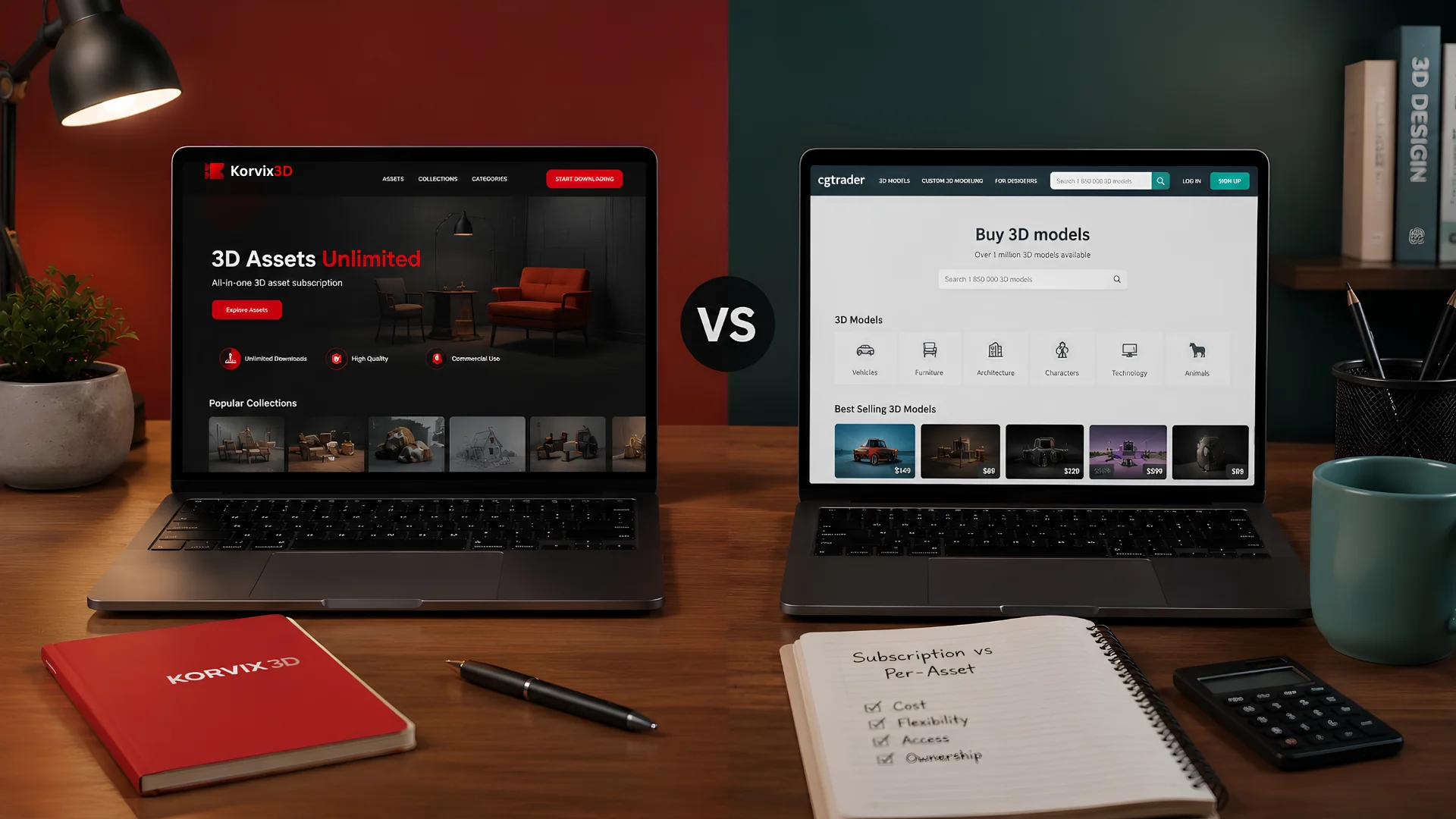
Platforms: CGTrader, TurboSquid, Sketchfab Store, Fab (Epic Games)
Typical creator cut: 40–80% of sale price depending on platform and exclusivity arrangement.
Model 2 - Subscription Pool Earnings (Modern)
You publish assets on a subscription platform. Every time a paying subscriber downloads your asset, you earn a share of the platform's monthly creator pool, a percentage of subscription revenue distributed across all creators based on download performance.
How income works: Your earnings grow as your download count grows. Popular assets generate recurring monthly income even without new sales. The pool distributes automatically every month.
Best for: Creators building a long-term passive income stream. General-purpose, high-demand assets that broad audiences need regularly, furniture, vehicles, props, architecture, nature assets, characters.
Platforms: Korvix3D, BlenderKit
Creator cut: On Korvix3D, 70% of subscription revenue goes into the creator pool. Your share is weighted by download volume and a quality multiplier, higher quality assets earn proportionally more per download.
Which Model Pays More?
The honest answer: subscription pool earnings typically outperform per-asset sales for most creators over time, because the income is recurring rather than transactional.
A model sold per-asset at $20 earns you $14 once. The same model on a subscription platform that gets downloaded 50 times a month earns you recurring monthly income indefinitely. The compounding effect of building a library on a subscription platform is significantly more powerful than accumulating individual sales on a per-asset marketplace.
This is why serious 3D creators increasingly treat subscription platforms as their primary income channel and per-asset marketplaces as a secondary one.
What Actually Sells: The 8 Highest-Demand 3D Asset Categories
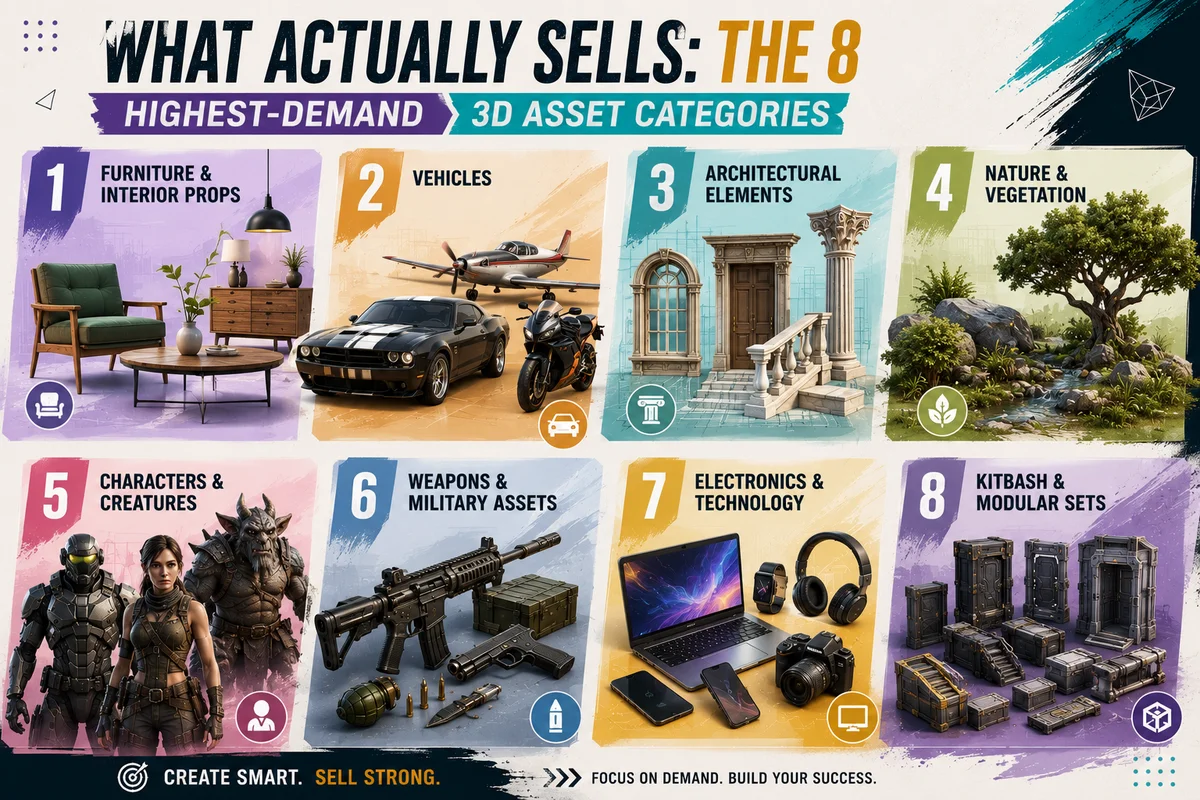
Not all 3D models sell equally. Understanding demand before you spend time creating is the single most important competitive advantage a new creator can develop.
1. Furniture and Interior Props
Consistently the highest-demand category on every platform. Architects, visualisation artists, game developers, and motion designers all need chairs, tables, sofas, lighting fixtures, and decorative objects. The market is large and never saturated because style trends change continuously, mid-century, industrial, Scandinavian, contemporary, each requiring fresh assets.
2. Vehicles
Cars, trucks, motorcycles, aircraft, boats, and futuristic vehicles are perennial bestsellers. Both game-ready (optimised, with LODs) and high-poly cinematic versions sell well. Specific vehicle models, a recognisable muscle car, a specific aircraft type, command premium prices.
3. Architectural Elements
Doors, windows, staircases, columns, facades, and structural details sell constantly to architects and visualisation artists. Modular architectural sets that can be combined to build varied structures are particularly valuable.
4. Nature and Vegetation
Trees, shrubs, rocks, terrain, water surfaces, and ground cover are needed by game developers and visualisation artists in enormous quantities. Photorealistic nature assets with high-quality PBR textures are chronically undersupplied relative to demand.
5. Characters and Creatures
Rigged, animation-ready characters are among the most technically demanding and highest-value assets on any platform. Human characters, fantasy creatures, sci-fi characters, and stylised cartoon characters all sell well. A well-rigged character with a full locomotion set is worth significantly more than a static mesh.
6. Weapons and Military Assets
Game developers are a large and consistent buyer of weapons assets, firearms, bladed weapons, futuristic sci-fi weapons. These require clean geometry, accurate proportions, and game-ready optimization.
7. Electronics and Technology
Computers, phones, cameras, screens, and consumer electronics sell well to product visualization artists, advertisers, and game developers. Modern, photorealistic electronic assets are consistently in demand.
8. Kitbash and Modular Sets
Collections of modular pieces that artists can combine into larger structures. Sci-fi kitbash sets, industrial modular pieces, and fantasy architecture sets are particularly popular among concept artists and game developers who need to build complex environments quickly.
How to Create Assets That Actually Sell
Knowing what sells is only the first step. Creating assets that consistently download and generate income requires meeting a set of technical and artistic standards that most beginners underestimate.
Technical Requirements That Non-Negotiable
Clean topology: Your geometry must have logical, clean edge flow with no unnecessary polygons, no n-gons in critical areas, and proper support loops where needed. Messy topology signals inexperience and produces assets that fail in production pipelines. Buyers review this before purchasing or downloading.
PBR-correct textures: All textures must be physically based, albedo, normal, roughness, metallic, and ambient occlusion maps at minimum. Texture resolution should be 2K at minimum for props, 4K for hero assets and character work. Textures must be properly UV-unwrapped with no stretching, no wasted UV space, and clean seam placement.
Multiple format availability: Buyers work in different software. Providing FBX, OBJ, and GLTF at minimum dramatically expands your potential audience. On Korvix3D, the bridge plugin ecosystem delivers your asset in the correct format for each user's active software, meaning your asset reaches Blender, Maya, 3DS Max, Cinema4D, Unity, and Unreal Engine users without you needing to manually package each version.
Real-world scale: Your asset must be modeled at accurate real-world dimensions. A chair that is 450mm seat height, a door that is 2100mm tall, a car that matches the actual dimensions of its reference. Assets at incorrect scale break pipelines and generate negative reviews.
Organized scene data: Clean object names, logical material names, properly named UV channels, no orphaned data, no hidden geometry. Artists importing your asset into a complex production scene need to be able to understand it immediately.
The Presentation Layer - Thumbnails and Previews
Your thumbnail is your sales team. On any marketplace or subscription platform, artists make their initial download or purchase decision based almost entirely on the thumbnail and preview renders. A technically excellent asset with mediocre presentation will be overlooked in favour of a slightly inferior asset with professional presentation.
Thumbnail best practices:
Render on a clean, neutral background, light grey or gradient works universally
Use three-point lighting that reveals the asset's form clearly
Show the asset at its most flattering angle in the primary thumbnail
Include additional renders showing: multiple angles, a wireframe view showing topology, a material/texture detail shot, and if applicable an in-context scene placement
Gallery renders: Provide a minimum of four preview images. Buyers who cannot see enough views of an asset will not risk a download or purchase. In-context renders, showing the asset placed in a realistic scene, dramatically increase download rates.
How to Price Your 3D Models
Pricing is one of the most intimidating parts of starting to sell, and one of the most important. Price too high and nothing moves. Price too low and you devalue your work and your category.
The Pricing Framework
Base your pricing on three factors:
1. Time and complexity: A simple prop that took two hours to model and texture should not be priced the same as a fully rigged character that took forty hours.
2. Market rate for comparable assets: Research what similar assets sell for on the platform. Search for your asset category and sort by popularity. Use the price range of assets with similar polygon counts, texture resolution, and technical quality as your benchmark.
3. Audience and use case: Assets targeting indie developers and students are price-sensitive. Assets targeting professional studios and commercial productions are significantly less so. A photorealistic product visualization asset used in a $500,000 advertising campaign represents enormous value to the buyer, price accordingly.
Suggested Starting Price Ranges (USD)
Asset Type | Entry Level | Mid Range | Premium |
|---|
Simple props | $5 – $15 | $15 – $35 | $35 – $60 |
Furniture and interiors | $10 – $25 | $25 – $60 | $60 – $120 |
Vehicles | $20 – $50 | $50 – $120 | $120 – $250 |
Characters (static) | $15 – $40 | $40 – $100 | $100 – $200 |
Characters (rigged) | $40 – $80 | $80 – $200 | $200 – $500 |
Kitbash sets | $30 – $80 | $80 – $180 | $180 – $400 |
Architectural elements | $10 – $30 | $30 – $80 | $80 – $150 |
Note on free assets: Offering a small number of high-quality free assets is one of the most effective strategies for building an audience and download history quickly. Free assets get downloaded, reviewed, and referenced by buyers who then return for your paid work.
Building a Creator Profile That Earns Trust
On any platform, buyers and subscribers choose between creators as much as between individual assets. A strong, professional creator profile dramatically increases conversion, particularly for buyers who are deciding whether to return to your library for future downloads.
Profile essentials:
A professional profile photo or branded avatar, not a default icon
A clear bio explaining your specialization, experience, and the types of assets you create
Links to your portfolio, ArtStation, or professional social profiles
A consistent visual style across your asset thumbnails that makes your library recognizable at a glance
Build a coherent library, not a random one: The most successful creators on any platform are known for something. They specialize in photorealistic furniture, or game-ready vehicles, or sci-fi architecture. A focused library signals expertise and attracts repeat customers who know what to expect from you.
Uploading one asset per category across twenty categories produces a library that looks scattered. Uploading twenty assets in a single focused category produces a library that looks authoritative.
The Korvix3D Creator Advantage
For creators choosing where to publish, the platform's economics matter as much as its reach. Here is what sets Korvix3D apart for creators specifically.
Effort-Weighted Earnings, Not Just Raw Downloads On most subscription platforms, creator income is purely proportional to download count. A low-quality asset downloaded frequently earns the same per-download as a masterwork. Korvix3D's Effort Rating Factor weights creator earnings by a quality multiplier, a composite of admin quality ratings (60% weight) and user reviews (40% weight).
The practical result: a creator who invests in genuinely high-quality work earns significantly more per download than one who mass-uploads average assets. Gold badge holders earn approximately 1.25x more per download than regular creators. Diamond badge holders earn approximately 1.5x more. Quality is directly rewarded.
Publish Without Leaving Your Software Korvix3D's bridge plugins for Blender, Autodesk Maya, 3DS Max, Cinema4D, Unity, and Unreal Engine work both ways, import and export. Creators can set asset name, thumbnails, gallery images, description, tags, pricing, and file formats directly from inside their 3D software and publish to the marketplace without opening a browser. For creators who live in their DCC tool, this workflow advantage is substantial.
Verified Badge System Korvix3D's Silver, Gold, and Diamond badge tiers give creators a path to increased visibility and earnings multipliers. Badges boost search ranking, increase impressions, and apply a download multiplier to earnings. For serious creators treating the platform as a primary income source, badge investment pays back quickly.
Start publishing on Korvix3D → https://korvix3d.com/signup
See how the bridge plugin export works → https://korvix3d.com/docs/plugins/architecture
The Long Game: Building Passive Income From 3D Models
The creators who generate meaningful passive income from 3D models are not the ones who uploaded ten assets and waited. They are the ones who treated it like a long-term content strategy.
Here is what that looks like in practice:
Consistency over bursts. Two or three new assets per month, published consistently, compounds into a significant library over a year. A library of 100 quality assets generates far more income than 10 exceptional ones, because download distribution spreads across the library and different assets serve different buyers.
Respond to reviews. Creators who respond to user feedback, fixing reported issues, adding requested formats, improving documentation, earn higher ratings, more downloads, and repeat customers.
Track what downloads. Pay attention to which assets in your library get the most downloads and create more in those categories. Your download data is a direct signal from the market about what it needs from you specifically.
Use your publishing platform's community. Engage in creator forums, Discord servers, and social media communities around your specialization. Creators with an active community presence get more downloads, more shares, and more visibility than creators who publish silently.
Think in libraries, not assets. The most powerful creator libraries are coherent, a set of assets that work together, share a visual language, and serve the same buyer. A creator who builds a complete mid-century modern interior library serves interior visualization artists completely, rather than serving everyone partially.
Frequently Asked Questions
How much can I realistically earn selling 3D models online? It varies enormously based on quality, volume, category, and platform. Beginning creators with a small library typically earn $50–$300/month. Established creators with large, high-quality libraries in popular categories earn $1,000–$5,000+/month. The income is highly scalable because it compounds, each new asset adds to the earning potential of the library without replacing previous assets.
Do I need professional software to sell 3D models? No. Blender is free, produces professional-quality assets, and is fully supported by platforms like Korvix3D. The quality of the output matters, not the price of the tool that produced it.
Can I sell the same model on multiple platforms? Generally yes, unless you sign an exclusivity agreement with a specific platform. Most platforms do not require exclusivity. Publishing on multiple platforms maximises your asset's income potential. Check each platform's terms before publishing.
What file formats should I provide with my assets? FBX, OBJ, and GLTF at minimum. These cover the broadest audience. On Korvix3D, the bridge plugin system handles format delivery automatically, your asset is delivered in the correct format for each user's software without you needing to export every format manually.
How long does it take to start earning from 3D model sales? First earnings typically appear within the first one to three months of publishing, depending on library size, asset quality, and category demand. Meaningful recurring income, where the library generates consistent monthly earnings without constant new uploads, typically takes six to twelve months of consistent publishing.
Does the quality of my preview renders really matter that much? Yes, more than most beginners expect. On subscription platforms where download is free to the user, the preview render is the only variable that drives the download decision. Identical assets with professional versus amateur preview renders produce download rates that can differ by 300–500%.


You have spent hundreds of hours sharpening your 3D modeling skills. Your portfolio is growing. The work is getting genuinely good. And at some point, a thought occurs: other people need exactly what you are making. Why not get paid for it?
Selling 3D models online is one of the most accessible passive income streams available to digital artists today. A model you build once can generate income for months or years. The global market for 3D content is growing rapidly, driven by game development, film, architectural visualization, AR/VR, product design, and a dozen other industries that run on 3D assets.
But most beginner creators approach it wrong. They upload a handful of models, see no sales, and conclude that it does not work. The reality is that selling 3D models online is a craft in itself, separate from the craft of modeling, and it rewards the artists who understand it.
This guide gives you the complete picture: where to sell, what sells, how to price, how to present your work, and how to build something that generates real, compounding income over time.
The Opportunity: Why Now is a Great Time to Sell 3D Models
The demand for 3D content has never been higher, and it is still accelerating.
Game development has exploded at every scale, from AAA studios to millions of solo indie developers who all need assets. Architectural visualization has gone from a specialist service to a standard part of the property industry. AR and VR are creating entirely new categories of 3D content demand. Ecommerce brands are replacing physical product photography with 3D renders. The metaverse, however it ultimately develops, runs entirely on 3D assets.
Every one of these industries needs more 3D content than the world's creators are currently producing. The gap between supply and demand is enormous, and it creates real income opportunity for creators who position themselves correctly.
Understanding the Two Ways to Earn From 3D Models
Before choosing a platform, understand the two fundamentally different earning models available to 3D creators.
Model 1 - Per-Asset Sales (Traditional)
You list individual models at fixed prices. A buyer pays once and downloads the asset. You receive a percentage of the sale price.
How income works: Entirely dependent on sales volume. You earn nothing if nothing sells. A popular asset can generate strong recurring income. A niche asset may sell once a year.
Best for: Highly specific, high-demand assets where buyers are willing to pay a premium for exactly what they need. Character rigs, branded product models, architectural hero pieces.
Platforms: CGTrader, TurboSquid, Sketchfab Store, Fab (Epic Games)
Typical creator cut: 40–80% of sale price depending on platform and exclusivity arrangement.
Model 2 - Subscription Pool Earnings (Modern)
You publish assets on a subscription platform. Every time a paying subscriber downloads your asset, you earn a share of the platform's monthly creator pool, a percentage of subscription revenue distributed across all creators based on download performance.
How income works: Your earnings grow as your download count grows. Popular assets generate recurring monthly income even without new sales. The pool distributes automatically every month.
Best for: Creators building a long-term passive income stream. General-purpose, high-demand assets that broad audiences need regularly, furniture, vehicles, props, architecture, nature assets, characters.
Platforms: Korvix3D, BlenderKit
Creator cut: On Korvix3D, 70% of subscription revenue goes into the creator pool. Your share is weighted by download volume and a quality multiplier, higher quality assets earn proportionally more per download.
Which Model Pays More?
The honest answer: subscription pool earnings typically outperform per-asset sales for most creators over time, because the income is recurring rather than transactional.
A model sold per-asset at $20 earns you $14 once. The same model on a subscription platform that gets downloaded 50 times a month earns you recurring monthly income indefinitely. The compounding effect of building a library on a subscription platform is significantly more powerful than accumulating individual sales on a per-asset marketplace.
This is why serious 3D creators increasingly treat subscription platforms as their primary income channel and per-asset marketplaces as a secondary one.
What Actually Sells: The 8 Highest-Demand 3D Asset Categories
Not all 3D models sell equally. Understanding demand before you spend time creating is the single most important competitive advantage a new creator can develop.
1. Furniture and Interior Props
Consistently the highest-demand category on every platform. Architects, visualisation artists, game developers, and motion designers all need chairs, tables, sofas, lighting fixtures, and decorative objects. The market is large and never saturated because style trends change continuously, mid-century, industrial, Scandinavian, contemporary, each requiring fresh assets.
2. Vehicles
Cars, trucks, motorcycles, aircraft, boats, and futuristic vehicles are perennial bestsellers. Both game-ready (optimised, with LODs) and high-poly cinematic versions sell well. Specific vehicle models, a recognisable muscle car, a specific aircraft type, command premium prices.
3. Architectural Elements
Doors, windows, staircases, columns, facades, and structural details sell constantly to architects and visualisation artists. Modular architectural sets that can be combined to build varied structures are particularly valuable.
4. Nature and Vegetation
Trees, shrubs, rocks, terrain, water surfaces, and ground cover are needed by game developers and visualisation artists in enormous quantities. Photorealistic nature assets with high-quality PBR textures are chronically undersupplied relative to demand.
5. Characters and Creatures
Rigged, animation-ready characters are among the most technically demanding and highest-value assets on any platform. Human characters, fantasy creatures, sci-fi characters, and stylised cartoon characters all sell well. A well-rigged character with a full locomotion set is worth significantly more than a static mesh.
6. Weapons and Military Assets
Game developers are a large and consistent buyer of weapons assets, firearms, bladed weapons, futuristic sci-fi weapons. These require clean geometry, accurate proportions, and game-ready optimization.
7. Electronics and Technology
Computers, phones, cameras, screens, and consumer electronics sell well to product visualization artists, advertisers, and game developers. Modern, photorealistic electronic assets are consistently in demand.
8. Kitbash and Modular Sets
Collections of modular pieces that artists can combine into larger structures. Sci-fi kitbash sets, industrial modular pieces, and fantasy architecture sets are particularly popular among concept artists and game developers who need to build complex environments quickly.
How to Create Assets That Actually Sell
Knowing what sells is only the first step. Creating assets that consistently download and generate income requires meeting a set of technical and artistic standards that most beginners underestimate.
Technical Requirements That Non-Negotiable
Clean topology: Your geometry must have logical, clean edge flow with no unnecessary polygons, no n-gons in critical areas, and proper support loops where needed. Messy topology signals inexperience and produces assets that fail in production pipelines. Buyers review this before purchasing or downloading.
PBR-correct textures: All textures must be physically based, albedo, normal, roughness, metallic, and ambient occlusion maps at minimum. Texture resolution should be 2K at minimum for props, 4K for hero assets and character work. Textures must be properly UV-unwrapped with no stretching, no wasted UV space, and clean seam placement.
Multiple format availability: Buyers work in different software. Providing FBX, OBJ, and GLTF at minimum dramatically expands your potential audience. On Korvix3D, the bridge plugin ecosystem delivers your asset in the correct format for each user's active software, meaning your asset reaches Blender, Maya, 3DS Max, Cinema4D, Unity, and Unreal Engine users without you needing to manually package each version.
Real-world scale: Your asset must be modeled at accurate real-world dimensions. A chair that is 450mm seat height, a door that is 2100mm tall, a car that matches the actual dimensions of its reference. Assets at incorrect scale break pipelines and generate negative reviews.
Organized scene data: Clean object names, logical material names, properly named UV channels, no orphaned data, no hidden geometry. Artists importing your asset into a complex production scene need to be able to understand it immediately.
The Presentation Layer - Thumbnails and Previews
Your thumbnail is your sales team. On any marketplace or subscription platform, artists make their initial download or purchase decision based almost entirely on the thumbnail and preview renders. A technically excellent asset with mediocre presentation will be overlooked in favour of a slightly inferior asset with professional presentation.
Thumbnail best practices:
Render on a clean, neutral background, light grey or gradient works universally
Use three-point lighting that reveals the asset's form clearly
Show the asset at its most flattering angle in the primary thumbnail
Include additional renders showing: multiple angles, a wireframe view showing topology, a material/texture detail shot, and if applicable an in-context scene placement
Gallery renders: Provide a minimum of four preview images. Buyers who cannot see enough views of an asset will not risk a download or purchase. In-context renders, showing the asset placed in a realistic scene, dramatically increase download rates.
How to Price Your 3D Models
Pricing is one of the most intimidating parts of starting to sell, and one of the most important. Price too high and nothing moves. Price too low and you devalue your work and your category.
The Pricing Framework
Base your pricing on three factors:
1. Time and complexity: A simple prop that took two hours to model and texture should not be priced the same as a fully rigged character that took forty hours.
2. Market rate for comparable assets: Research what similar assets sell for on the platform. Search for your asset category and sort by popularity. Use the price range of assets with similar polygon counts, texture resolution, and technical quality as your benchmark.
3. Audience and use case: Assets targeting indie developers and students are price-sensitive. Assets targeting professional studios and commercial productions are significantly less so. A photorealistic product visualization asset used in a $500,000 advertising campaign represents enormous value to the buyer, price accordingly.
Suggested Starting Price Ranges (USD)
Asset Type
Entry Level
Mid Range
Premium
Simple props
$5 – $15
$15 – $35
$35 – $60
Furniture and interiors
$10 – $25
$25 – $60
$60 – $120
Vehicles
$20 – $50
$50 – $120
$120 – $250
Characters (static)
$15 – $40
$40 – $100
$100 – $200
Characters (rigged)
$40 – $80
$80 – $200
$200 – $500
Kitbash sets
$30 – $80
$80 – $180
$180 – $400
Architectural elements
$10 – $30
$30 – $80
$80 – $150
Note on free assets: Offering a small number of high-quality free assets is one of the most effective strategies for building an audience and download history quickly. Free assets get downloaded, reviewed, and referenced by buyers who then return for your paid work.
Building a Creator Profile That Earns Trust
On any platform, buyers and subscribers choose between creators as much as between individual assets. A strong, professional creator profile dramatically increases conversion, particularly for buyers who are deciding whether to return to your library for future downloads.
Profile essentials:
A professional profile photo or branded avatar, not a default icon
A clear bio explaining your specialization, experience, and the types of assets you create
Links to your portfolio, ArtStation, or professional social profiles
A consistent visual style across your asset thumbnails that makes your library recognizable at a glance
Build a coherent library, not a random one: The most successful creators on any platform are known for something. They specialize in photorealistic furniture, or game-ready vehicles, or sci-fi architecture. A focused library signals expertise and attracts repeat customers who know what to expect from you.
Uploading one asset per category across twenty categories produces a library that looks scattered. Uploading twenty assets in a single focused category produces a library that looks authoritative.
The Korvix3D Creator Advantage
For creators choosing where to publish, the platform's economics matter as much as its reach. Here is what sets Korvix3D apart for creators specifically.
Effort-Weighted Earnings, Not Just Raw Downloads On most subscription platforms, creator income is purely proportional to download count. A low-quality asset downloaded frequently earns the same per-download as a masterwork. Korvix3D's Effort Rating Factor weights creator earnings by a quality multiplier, a composite of admin quality ratings (60% weight) and user reviews (40% weight).
The practical result: a creator who invests in genuinely high-quality work earns significantly more per download than one who mass-uploads average assets. Gold badge holders earn approximately 1.25x more per download than regular creators. Diamond badge holders earn approximately 1.5x more. Quality is directly rewarded.
Publish Without Leaving Your Software Korvix3D's bridge plugins for Blender, Autodesk Maya, 3DS Max, Cinema4D, Unity, and Unreal Engine work both ways, import and export. Creators can set asset name, thumbnails, gallery images, description, tags, pricing, and file formats directly from inside their 3D software and publish to the marketplace without opening a browser. For creators who live in their DCC tool, this workflow advantage is substantial.
Verified Badge System Korvix3D's Silver, Gold, and Diamond badge tiers give creators a path to increased visibility and earnings multipliers. Badges boost search ranking, increase impressions, and apply a download multiplier to earnings. For serious creators treating the platform as a primary income source, badge investment pays back quickly.
Start publishing on Korvix3D → https://korvix3d.com/signup
See how the bridge plugin export works → https://korvix3d.com/docs/plugins/architecture
The Long Game: Building Passive Income From 3D Models
The creators who generate meaningful passive income from 3D models are not the ones who uploaded ten assets and waited. They are the ones who treated it like a long-term content strategy.
Here is what that looks like in practice:
Consistency over bursts. Two or three new assets per month, published consistently, compounds into a significant library over a year. A library of 100 quality assets generates far more income than 10 exceptional ones, because download distribution spreads across the library and different assets serve different buyers.
Respond to reviews. Creators who respond to user feedback, fixing reported issues, adding requested formats, improving documentation, earn higher ratings, more downloads, and repeat customers.
Track what downloads. Pay attention to which assets in your library get the most downloads and create more in those categories. Your download data is a direct signal from the market about what it needs from you specifically.
Use your publishing platform's community. Engage in creator forums, Discord servers, and social media communities around your specialization. Creators with an active community presence get more downloads, more shares, and more visibility than creators who publish silently.
Think in libraries, not assets. The most powerful creator libraries are coherent, a set of assets that work together, share a visual language, and serve the same buyer. A creator who builds a complete mid-century modern interior library serves interior visualization artists completely, rather than serving everyone partially.
Frequently Asked Questions
How much can I realistically earn selling 3D models online? It varies enormously based on quality, volume, category, and platform. Beginning creators with a small library typically earn $50–$300/month. Established creators with large, high-quality libraries in popular categories earn $1,000–$5,000+/month. The income is highly scalable because it compounds, each new asset adds to the earning potential of the library without replacing previous assets.
Do I need professional software to sell 3D models? No. Blender is free, produces professional-quality assets, and is fully supported by platforms like Korvix3D. The quality of the output matters, not the price of the tool that produced it.
Can I sell the same model on multiple platforms? Generally yes, unless you sign an exclusivity agreement with a specific platform. Most platforms do not require exclusivity. Publishing on multiple platforms maximises your asset's income potential. Check each platform's terms before publishing.
What file formats should I provide with my assets? FBX, OBJ, and GLTF at minimum. These cover the broadest audience. On Korvix3D, the bridge plugin system handles format delivery automatically, your asset is delivered in the correct format for each user's software without you needing to export every format manually.
How long does it take to start earning from 3D model sales? First earnings typically appear within the first one to three months of publishing, depending on library size, asset quality, and category demand. Meaningful recurring income, where the library generates consistent monthly earnings without constant new uploads, typically takes six to twelve months of consistent publishing.
Does the quality of my preview renders really matter that much? Yes, more than most beginners expect. On subscription platforms where download is free to the user, the preview render is the only variable that drives the download decision. Identical assets with professional versus amateur preview renders produce download rates that can differ by 300–500%.